Two-Factor Authentication
Two-Factor Authentication (2FA) adds an extra layer of security to user accounts.
Methods
| Method | Description |
|---|---|
| Phone OTP | One-time password sent via SMS |
| QR Code | TOTP via authenticator app |
Enable 2FA (Admin)
- Go to Admin Panel > Authentication > Settings
- Enable Two-Factor Authentication
- Select preferred methods
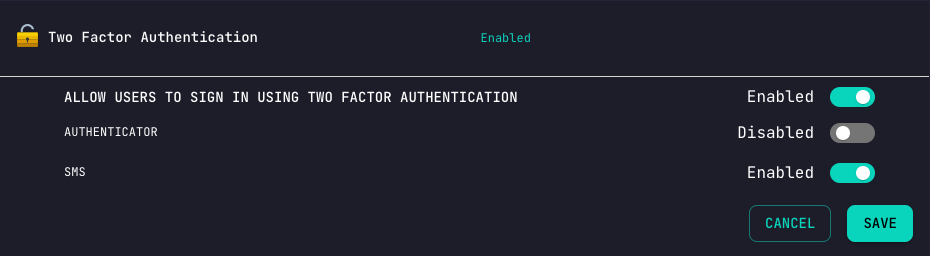
SMS Module Required
Phone-based 2FA requires the SMS module to be configured.
User Flow
Enable 2FA for Account
curl -X POST 'http://localhost:3000/authentication/twoFa/enable' \
  -H 'Authorization: Bearer YOUR_TOKEN'
Response (QR Code method):
{
  "qrCode": "data:image/png;base64,...",
  "secret": "JBSWY3DPEHPK3PXP"
}
Login with 2FA
- Initial Login:
curl -X POST 'http://localhost:3000/authentication/local' \
  -H 'Content-Type: application/json' \
  -d '{"email": "user@example.com", "password": "password"}'
- Response indicates 2FA required:
{
  "message": "2FA required",
  "twoFaRequired": true
}
- Submit 2FA code:
curl -X POST 'http://localhost:3000/authentication/twoFa/verify' \
  -H 'Content-Type: application/json' \
  -d '{"code": "123456"}'
Backup Codes
Generate backup codes for account recovery:
curl -X POST 'http://localhost:3000/authentication/twoFa/backup-codes' \
  -H 'Authorization: Bearer YOUR_TOKEN'
Response:
{
  "backupCodes": [
    "ABC12345",
    "DEF67890",
    "GHI11223",
    ...
  ]
}
warning
Backup codes are one-time use. Store them securely.
Disable 2FA
curl -X POST 'http://localhost:3000/authentication/twoFa/disable' \
  -H 'Authorization: Bearer YOUR_TOKEN' \
  -H 'Content-Type: application/json' \
  -d '{"code": "123456"}'
Phone OTP Setup
- User must have phone number on account
- Enable phone 2FA in settings
- OTP sent via configured SMS provider
QR Code Setup
- Enable QR/TOTP in settings
- User scans QR code with authenticator app
- App generates time-based codes
Supported Apps
- Google Authenticator
- Authy
- Microsoft Authenticator
- 1Password
- Any TOTP-compatible app
Security Best Practices
- Require 2FA for admin accounts
- Offer backup codes during setup
- Allow multiple methods for flexibility
- Log 2FA events for security auditing